Thursday, July 30, 2009

Dancing Images

1.Download the below file.
Download

2.GO to Mozilla Firefox.

3.Go to http://www.google.co.in/firefox?client=firefox-a&rls=org.mozilla:en-US:official

4.Go To Address bar and Copy it from there and paste it.

5.Click on Enter.

6.Enjoy.

Wednesday, July 29, 2009

What to do when your Orkut Account is Hacked ?

It can be a nightmare if someone else takes control of your Google Account because all your Google services like Gmail, Orkut, Google Calendar, Blogger, AdSense, Google Docs and even Google Checkout are tied to the same account.

Here are some options suggested by Google Support when your forget the Gmail password or if someone else takes ownership of your Google Account and changes the password:

1. Reset Your Google Account Password:
Type the email address associated with your Google Account or Gmail user name at google.com/accounts/ForgotPasswd– you will receive an email at your secondary email address with a link to reset your Google Account Password. This will not work if the other person has changed your secondary email address or if you no longer have access to that address.

2. For Google Accounts Associated with Gmail:
If you have problems while logging into your Gmail account, you can consider contacting Google byfilling this form.It however requires you to remember the exact date when you created that Gmail account.

3. For Hijacked Google Accounts Not Linked to Gmail:
If your Google Account doesn’t use a Gmail address, contact Google byfilling this form. This approach may help bring back your Google Account if you religiously preserve all your old emails. You will be required to know the exact creation date of your Google Account plus a copy of that original “Google Email Verification” message.It may be slightly tough to get your Google Account back but definitely not impossible if you have the relevant information in your secondary email mailbox.

Thursday, July 2, 2009

How To: Make Your XP Look Like Mac OSX In 3 Simple Steps

Alright. After I showed you how to make your XP look like Vista, some people asked me to post a guide to making your XP look like Mac OSX. Leopard, to be precise. There are two ways to accomplish the OSX look: the easy way - with a transformation pack, and the hard way - manually. I will, of course, show you how to do this the easy way, but if it for some reason doesn’t work for you, email me or comment and I’ll teach you to do it all manually. So here’s how it’s done the easy way:

Step 1: Get a transformation pack.
The best Mac OSX transformation pack for Windows XP is probablyFlyakiteOSX. The creator’s website itself is worth the visit, but if it doesn’t load in your browser, get Firefox, and here’s a Download Link.

Step 2: Install
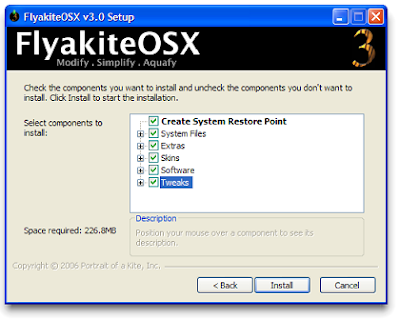
Run the installer and when you get to the following screen, MAKE SURE you check the box Create System Restore Point. The transformation pack will change a lot of system files and settings and although you should be able to uninstall easily later, you might find yourself in a mess if something goes wrong. This way you can always do a System Restore. Check any other options you want and you’re ready!

Step 3: Enjoy!

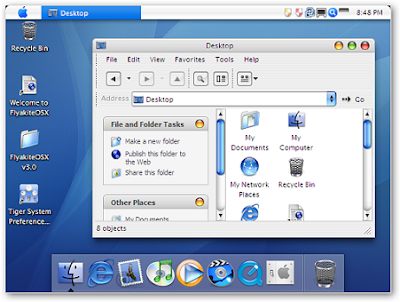
After the restart, you should be able to convince all, but the most die-hard Mac lovers that you have an OSX. This is what your desktop should look like now:

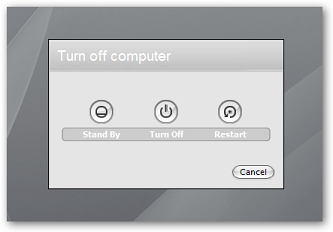
This also leaves you a nice Mac OSX shutdown screen:

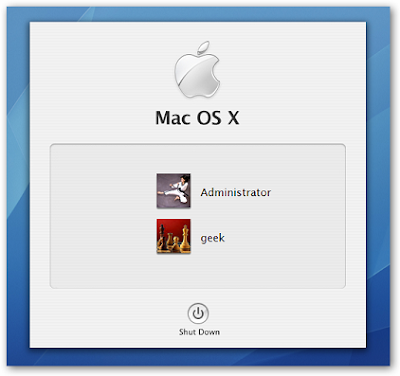
…And a Mac OSX logon screen:


Note: The transformation pack might trigger your anti-virus protection as it changes some system files, but this is probably a false positive. Be careful though, and remember to back up!

Miscellaneous Tricks

Scroll Wheel Mouse Trick:-

If you have a mouse with a scroll wheel, hold down the Ctrl key and at the same time, by scrolling up or down with the little scroll wheel, you can alter the size of the text of the website.


Change Explorer Web View Background:-

If you use Web View for your Internet Explorer, you can change the background that appears.
Edit or recreate the image >file:///C:/Windows/Web/Wallpaper/XXXX.bmp
Make sure you keep the file dimensions the same,i.e.,800x600 pixels.

Wednesday, July 1, 2009

Watch " Star Wars "


You Don't need to Download IT !

Just :

Start>>Run , type : telnet towel.blinkenlights.nl

And Enjoy The Movie !